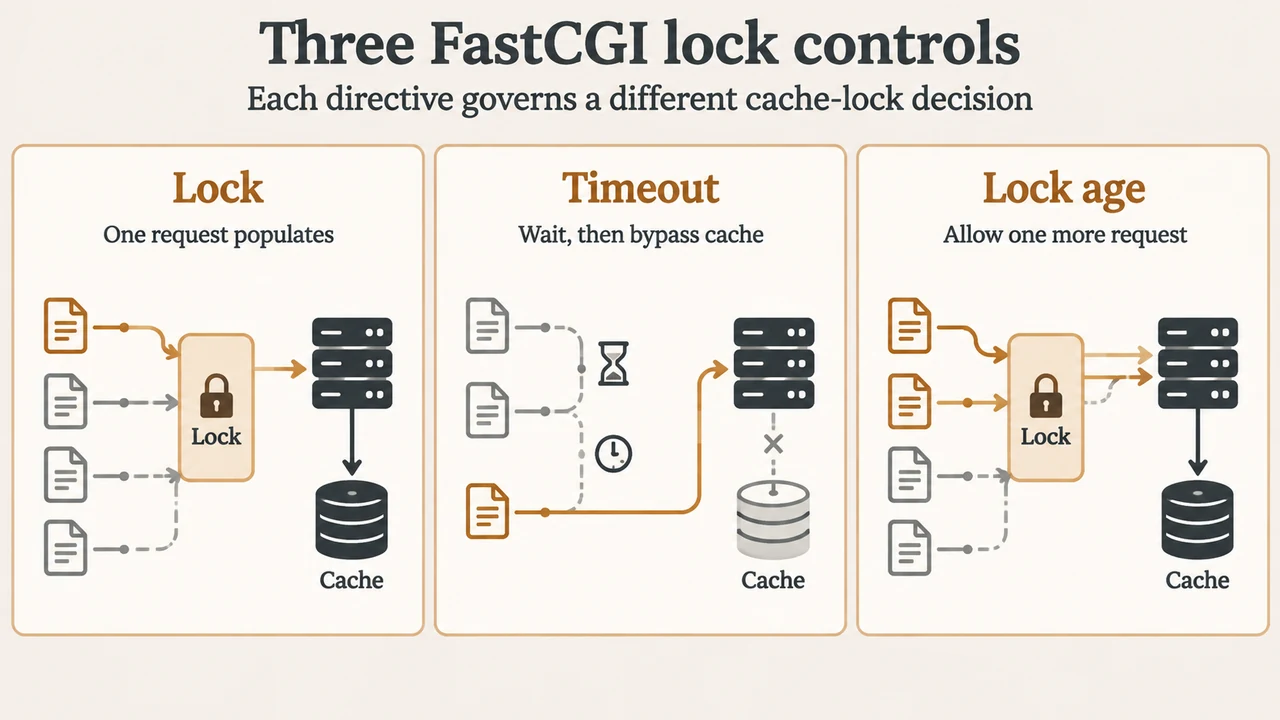
When multiple clients simultaneously request an uncached resource, an application gateway can overload an upstream FastCGI backend by passing all identical requests at the same moment. Under the ngx_http_fastcgi_module, Nginx provides directives to minimize upstream accesses when populating a new cache entry: fastcgi_cache_lock, fastcgi_cache_lock_timeout, and fastcgi_cache_lock_age.
What Is fastcgi_cache_lock and How Does It Serialize Requests?
The fastcgi_cache_lock directive controls whether Nginx permits multiple simultaneous requests to query the FastCGI backend when populating a new cache entry.
According to the official Nginx documentation, its syntax, default value, and valid contexts are:
Syntax: fastcgi_cache_lock on | off;
Default: fastcgi_cache_lock off;
Context: http, server, location
By default, fastcgi_cache_lock is set to off. When enabled with on, only one request at a time is permitted to populate a new cache element identified according to the fastcgi_cache_key directive by passing a request to a FastCGI server.
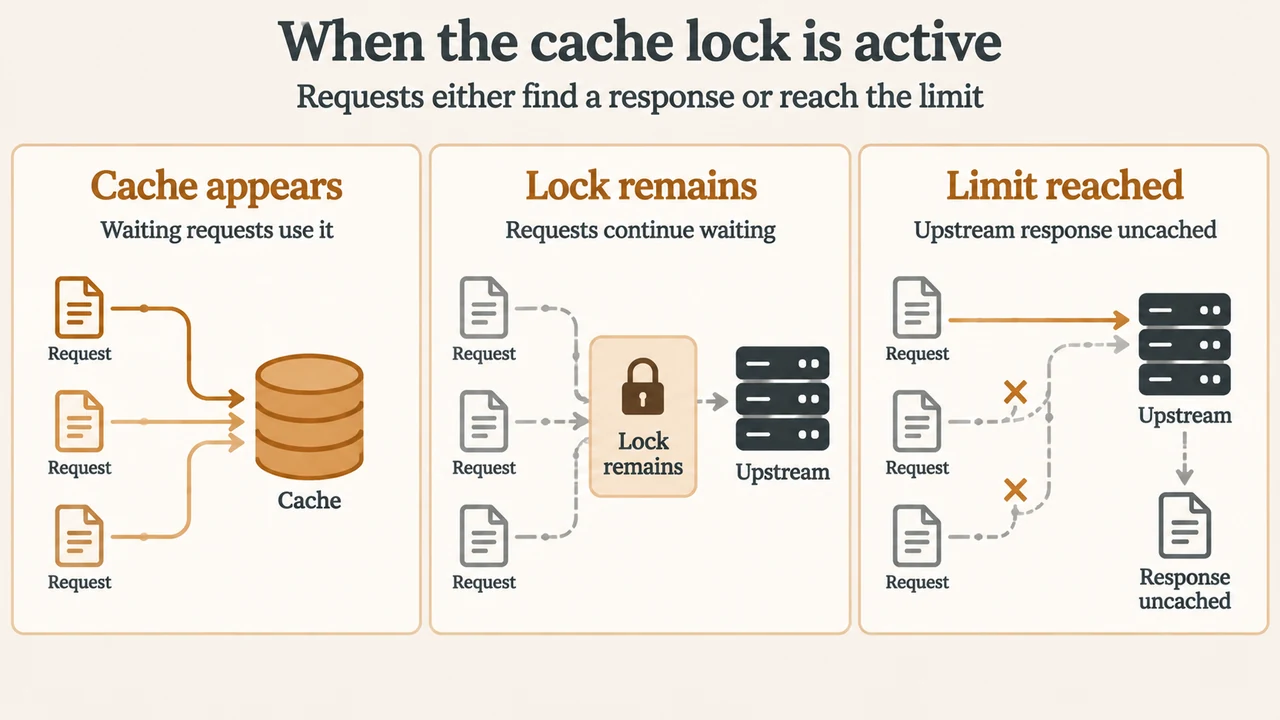
While that request is being processed upstream, other incoming requests for the same cache element do not pass to the FastCGI server immediately. Instead, they wait for one of two outcomes:
- A response appears in the cache, allowing waiting requests to be served from the cache.
- The cache lock for the element is released, or the waiting duration reaches the time set by
fastcgi_cache_lock_timeout.
Handling Delays and Failures: fastcgi_cache_lock_timeout and fastcgi_cache_lock_age
Nginx provides two distinct timing directives to govern behavior when populating a cache element takes longer than expected: fastcgi_cache_lock_timeout and fastcgi_cache_lock_age.
fastcgi_cache_lock_timeout
Syntax: fastcgi_cache_lock_timeout time;
Default: fastcgi_cache_lock_timeout 5s;
Context: http, server, location
Introduced in Nginx 1.1.12, fastcgi_cache_lock_timeout sets a timeout for fastcgi_cache_lock. Waiting requests wait up to this duration for a response to appear in the cache or for the lock to be released. The default is 5 seconds (5s).
When the timeout expires, the waiting request is passed to the FastCGI server. In Nginx version 1.7.8 and newer, the response to that request is not cached. (Before 1.7.8, the response could be cached).
fastcgi_cache_lock_age
Syntax: fastcgi_cache_lock_age time;
Default: fastcgi_cache_lock_age 5s;
Context: http, server, location
Introduced in Nginx version 1.7.8, fastcgi_cache_lock_age sets a time threshold for an in-flight cache population request. If the last request passed to the FastCGI server to populate a new cache element has not completed within the specified time (defaulting to 5 seconds), one more request may be passed to the FastCGI server.
Interaction and Version Scope
Under Nginx version 1.7.8 and later, these directives coordinate as follows:
fastcgi_cache_lock_timeoutlimits how long an individual waiting request pauses before being dispatched to the FastCGI server without caching its response.fastcgi_cache_lock_agedetermines when an incomplete initial population attempt permits one additional request to be forwarded upstream while the prior request remains in flight.
Supported Example Configuration
The following configuration defines a cache path, cache key, and lock directives within a server and location block:
fastcgi_cache_path /data/nginx/cache keys_zone=cache_zone:10m;

server {
    listen 80;
    server_name example.com;

    location / {
        fastcgi_pass backend:9000;
        fastcgi_cache cache_zone;
        fastcgi_cache_key $uri;

        fastcgi_cache_lock on;
        fastcgi_cache_lock_timeout 5s;
        fastcgi_cache_lock_age 5s;
    }
}
In this setup under Nginx 1.7.8 or later, when multiple clients simultaneously request an uncached URI (such as /index.php), only the first request passes to backend:9000 to populate the new cache element for key $uri. Other requests for that key wait up to 5 seconds. Whether the cache is successfully populated depends on whether the response is cacheable under FastCGI caching rules (such as caching directives or headers like X-Accel-Expires, Expires, or Cache-Control, provided the response does not include a Set-Cookie header). If the response is cacheable and appears in the cache within 5 seconds, waiting requests are satisfied from the cache. If the initial request does not complete within 5 seconds, fastcgi_cache_lock_age allows one more request to pass to the FastCGI server, and any waiting request reaching its 5-second fastcgi_cache_lock_timeout is passed to the FastCGI server with its response remaining uncached.
Text version of the diagrams
- Three FastCGI lock controls: Lock — One request populates; Timeout — Wait, then bypass cache; Lock age — Allow one more request
- When the cache lock is active: Cache appears — Waiting requests use it; Lock remains — Requests continue waiting; Limit reached — Upstream response uncached
Research Method and Limitations
This explainer was prepared exclusively from public reference documentation excerpts of the official Nginx ngx_http_fastcgi_module specification. No accessible competing coverage was available in the supplied research inputs, and the provided primary documentation excerpt was truncated. This article is strictly limited to documented directive syntax, default values, context rules, version notes, and cache population behaviors stated in the visible excerpts; it does not report benchmarks, synthetic load measurements, or operational stress testing.