This research-based guide is for WordPress site owners who use Cloudflare and want to understand why a URL was served from Cloudflare’s cache or contacted the origin server. It covers Cloudflare’s documented cache statuses and Cache Analytics behavior. It does not claim that every WordPress page, plugin, session, or configuration is cacheable.
Start with the two signals
Use the CF-Cache-Status response header to inspect a particular response. Use Cache Analytics to review patterns across traffic. Cloudflare says Cache Analytics shows how much traffic is served from its cache versus the origin server, and lets you filter by hostname, path, cache status, and content type.
In the Cloudflare dashboard, Cache Analytics is available from the Caching page. Its Requests summary is based on a sample, and the displayed totals are extrapolated from that sample. The available query period and retention depend on the plan, so analytics should not be treated as a complete request-by-request record.
What the main CF-Cache-Status values mean
| Status | Documented meaning |
|---|---|
HIT |
The resource was found in Cloudflare’s cache. |
MISS |
The response was eligible for caching but was not present in the cache at request time, so it was served from the origin. |
DYNAMIC |
Cloudflare decided at request time that the asset was not eligible for cache, so it went to the origin without a cache lookup. |
BYPASS |
The request was initially eligible, but the origin response or configuration made the response not cacheable. |
EXPIRED |
The resource was in Cloudflare’s cache but had expired and was served from the origin. |
STALE |
The resource was served from Cloudflare’s cache after expiry because Cloudflare could not contact the origin for an updated copy. |
REVALIDATED |
The origin confirmed that the cached resource was unchanged, and Cloudflare served the response from cache. |
UPDATING |
The expired resource was served from cache while the origin update occurred in the background during stale-while-revalidate. |
NONE/UNKNOWN |
Cloudflare generated a response that was not eligible for caching, including some Worker, WAF, and redirect cases. |
How to interpret edge versus origin service
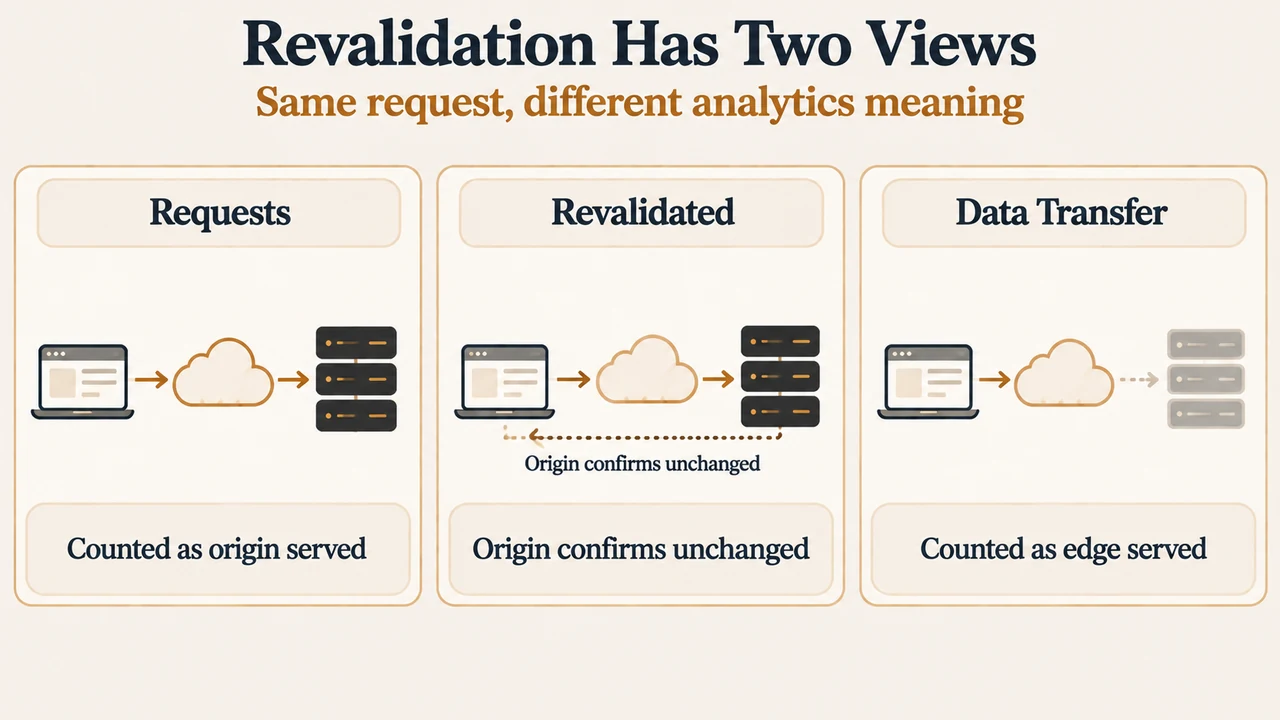
Cloudflare defines “Served by Cloudflare” as content served without contacting the origin. “Served by Origin” means traffic was served from the origin server. The same revalidated request is counted differently depending on the analytics view: in Data Transfer it is counted as Served by Cloudflare because the response body came from cache; in Requests it is counted as Served by Origin because Cloudflare contacted the origin to verify the content.
This distinction matters when reading a WordPress site’s dashboard. A revalidated response is not the same as a simple cache hit, but it also does not mean that the full response body was downloaded again from the origin.
Why a WordPress URL can be DYNAMIC or BYPASS
DYNAMIC describes an eligibility decision made before a cache lookup. Cloudflare documents several possible causes: the asset is not covered by the default cached file extensions and no rule makes it eligible; a Cache Rule or legacy bypass rule matches; or Development Mode is enabled. Cloudflare states that Development Mode suspends cache for three hours and returns DYNAMIC for every response.
BYPASS is a later decision. Cloudflare considered the request eligible, but the origin response or configuration prevented storage. Documented examples include Cache-Control: no-store or private, certain Set-Cookie responses, Vary: *, a response exceeding the plan’s cacheable size limit, and some requests containing an Authorization header. The exact result depends on the documented plan and Origin Cache Control configuration.
Do not treat a provider default as a universal guarantee. Cloudflare’s excerpts specify different behavior for Free, Pro, Business, and Enterprise plans in some cases, including Origin Cache Control and authorization-related caching. The status alone does not identify which WordPress component produced a response header.
What repeated MISS responses can and cannot tell you
A first MISS can be expected because the requested resource was not yet in the relevant cache. Cloudflare also documents that different data centers can each produce a first-request MISS, and that low-traffic assets can be evicted before the next request. Repeated MISS responses can also result from cache-key differences, such as changing query strings or configured cookies, headers, or device classifications.
Therefore, repeated MISS values do not by themselves prove that WordPress, a plugin, or Cloudflare is malfunctioning. They show that the response was eligible but not available under the cache decision and request conditions recorded for that response.
A narrow diagnostic reading method
- Inspect the response header for the exact URL and record
CF-Cache-Status. - Classify the result as a cache hit, an origin contact, an eligibility decision, or a response-time cacheability decision using the table above.
- In Cache Analytics, filter by hostname, path, cache status, or content type to see whether the status is concentrated in particular traffic.
- Interpret revalidation according to the selected Requests or Data Transfer view.
- If a URL expected to be cacheable remains MISS or BYPASS after documented configuration checks, Cloudflare’s troubleshooting excerpt says to capture two full responses, including request and response headers and
cf-rayvalues, and open a support case.
These steps establish what Cloudflare recorded. They do not establish that every WordPress request should have the same status, because cache eligibility and response headers can vary by URL and configuration.
Limits of this guide
This article was prepared from the supplied public Cloudflare documentation excerpts retrieved on September 22, 2026, plus competitor excerpts used only to compare coverage. The supplied troubleshooting passage is truncated, so this guide uses only the visible statements and does not reproduce an unseen step-by-step workflow. No hands-on test, lab measurement, benchmark, or comprehensive review was performed. Cloudflare’s plan-specific defaults and configuration conditions should be checked against the current documentation before making a production change.
Text version of the diagrams
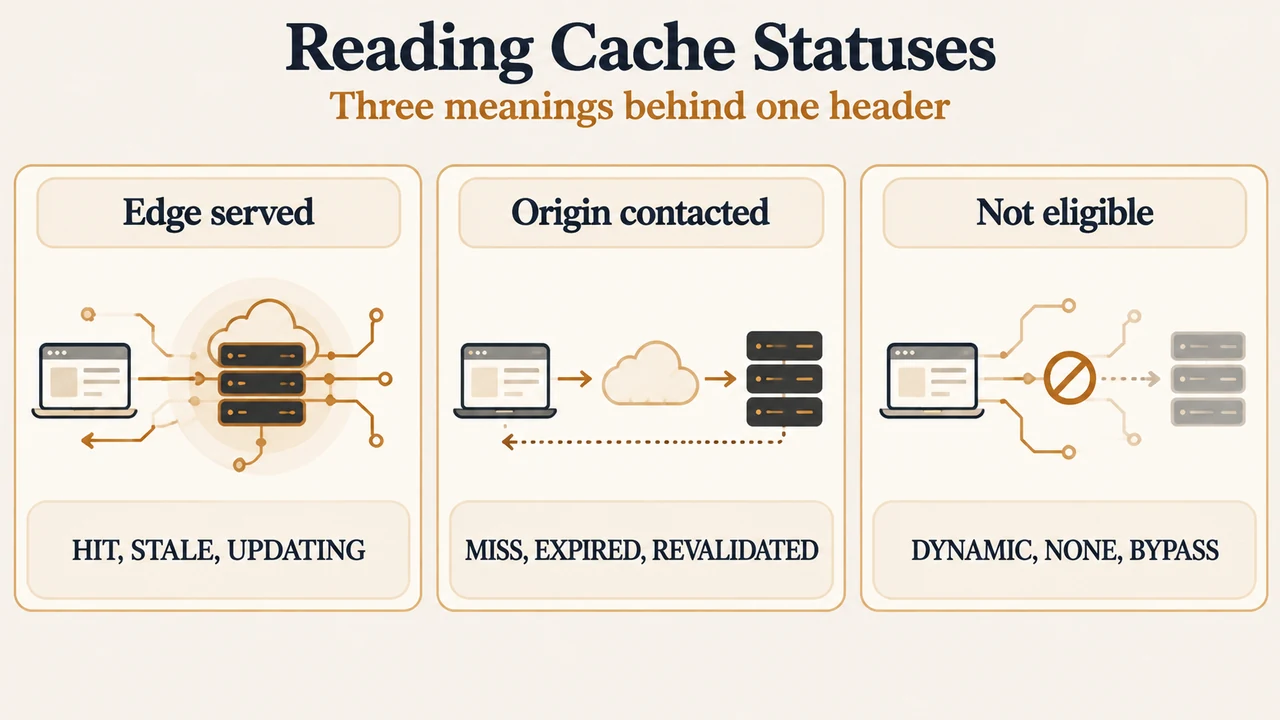
- Reading Cache Statuses: Edge served — HIT, STALE, UPDATING; Origin contacted — MISS, EXPIRED, REVALIDATED; Not eligible — DYNAMIC, NONE, BYPASS
- Revalidation Has Two Views: Requests — Counted as origin served; Revalidated — Origin confirms unchanged; Data Transfer — Counted as edge served
Sources
- Cloudflare Cache Analytics — analytics scope, filters, sampling, plan availability, and Requests versus Data Transfer.
- Cloudflare cache responses — definitions and documented causes for CF-Cache-Status values.
- Cloudflare: Investigate uncached responses — visible troubleshooting guidance and limitations for DYNAMIC, BYPASS, MISS, and revalidation results.