Understanding WordPress Object Caching and Query-Result Storage
The WordPress Object Cache reduces repeated trips to the database by caching computationally expensive query results and runtime data in memory. When code executes a complex database query or expensive calculation, it can store the resulting value using standard core functions such as wp_cache_set() and retrieve it on subsequent lookups with wp_cache_get(). If a cached value is present, WordPress retrieves the data directly from the cache rather than re-executing the SQL query.
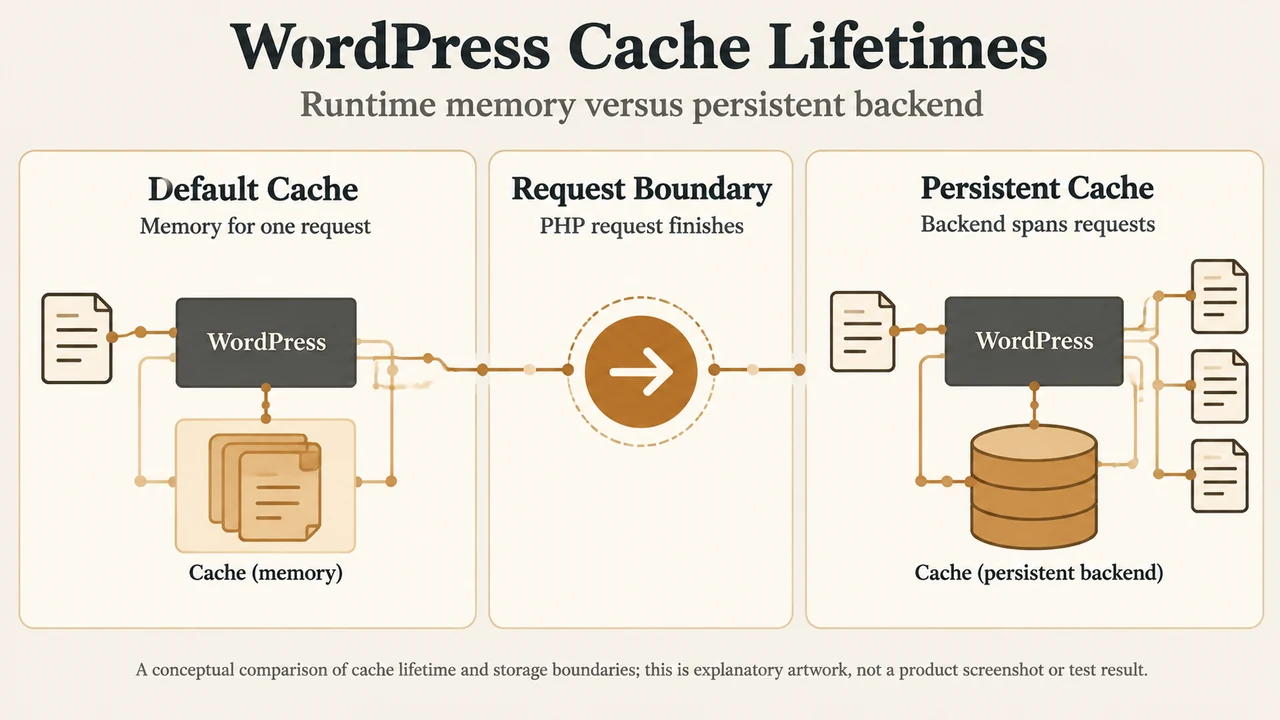
By default in WordPress core, the internal object cache defined in wp-includes/cache.php by the WP_Object_Cache class is non-persistent. In this default configuration, all cached items reside in memory only for the duration of the current script execution or HTTP request. When PHP finishes processing the request and the script exits, those cached items expire automatically and the memory is discarded. While this prevents identical queries from executing multiple times within a single page load, it does not retain cached data across page loads for future requests.
The object-cache.php Drop-In and Core Bootstrap Flow
WordPress enables external persistent object caching through an external drop-in file located at wp-content/object-cache.php. During the WordPress bootstrap process, the internal core function wp_start_object_cache() coordinates object cache initialization. The documentation explicitly notes that wp_start_object_cache() is marked private, meaning it is intended solely for internal WordPress core execution and must not be called directly by plugin or theme developers.
The documented sequence within wp_start_object_cache() proceeds through several discrete stages:
- Filter evaluation: The core filter
apply_filters( 'enable_loading_object_cache_dropin', true )is checked first. This filter runs before it can be used by standard plugins and is designed for non-web runtimes. If a callback returnsfalse,object-cache.phpis never loaded. - Drop-in inspection: If loading is enabled and
wp_cache_init()does not yet exist, WordPress checks whetherWP_CONTENT_DIR . '/object-cache.php'exists on disk. If found, it requires that file. If loading the drop-in results in thewp_cache_init()function existing, WordPress invokeswp_using_ext_object_cache( true )to flag external caching and re-initializes any filters or hooks set up manually by the drop-in viaWP_Hook::build_preinitialized_hooks(). - Interaction with
advanced-cache.php: The drop-inadvanced-cache.phpcan sometimes loadobject-cache.phpbeforewp_start_object_cache()executes. Core explicitly handles this condition: ifwp_using_ext_object_cache()is still false butWP_CONTENT_DIR . '/object-cache.php'exists, WordPress setswp_using_ext_object_cache( true ). - Fallback to core: If external object caching is not enabled, WordPress requires the default core file
wp-includes/cache.php. - Cache initialization and group registration: WordPress initializes the cache by calling
wp_cache_init()(or switches blog context viawp_cache_switch_to_blog()on subsequent resets). If available, it then registers core global groups and core non-persistent groups.
Core Cache Groups: Global vs. Non-Persistent
Data stored in the object cache is organized using keys and groups. Grouping allows duplicate keys across different functional areas without namespace collisions. WordPress provides standard functions to register special group categories:
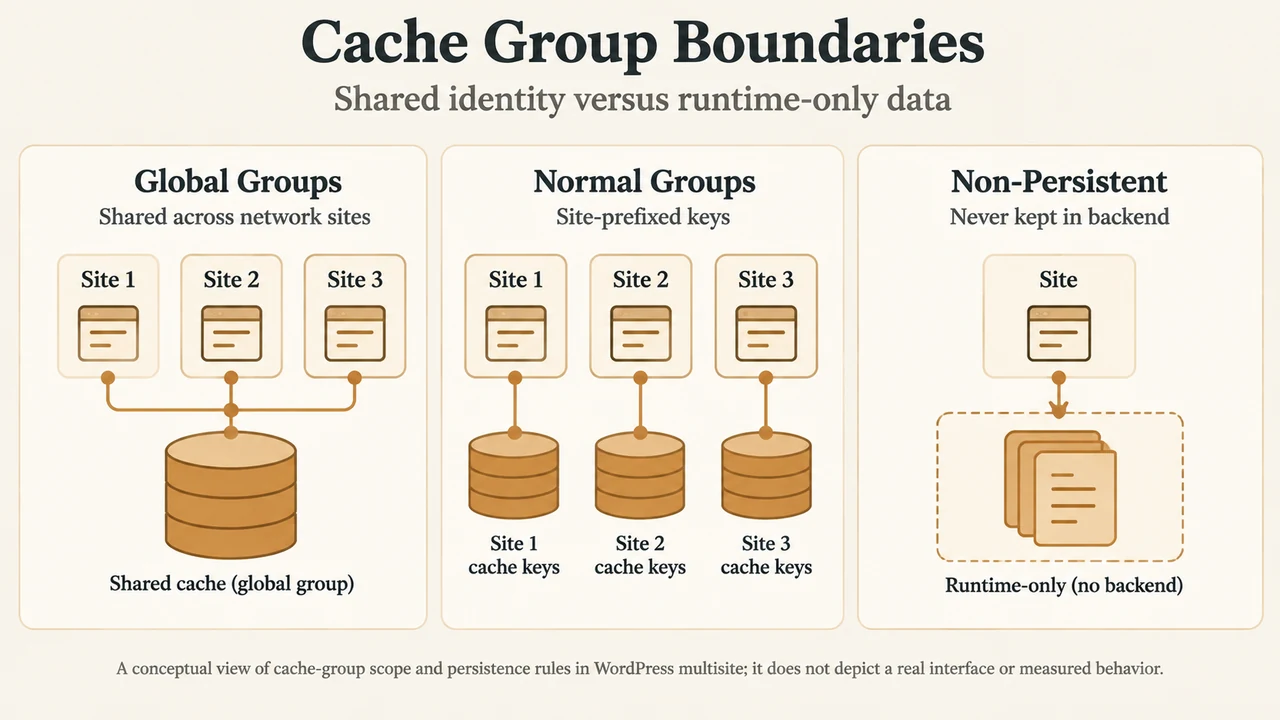
- Global Cache Groups: In WordPress multisite networks, cache keys are prefixed with the site’s blog prefix by default unless the group is registered as global. Registering groups through
wp_cache_add_global_groups()shares those cached items across all sites in the network. Core registers global groups such asusers,userlogins,user_meta,site-options,site-transient, andnetworks. - Non-Persistent Cache Groups: Certain data should only be kept for the duration of a single script session and not retained between script invocations or HTTP requests, even when a persistent cache backend is installed. WordPress registers these groups using
wp_cache_add_non_persistent_groups(). Core registerscounts,plugins, andtheme_jsonas non-persistent groups.
Documented Persistent Cache Plugins and Backend Requirements
Prior to WordPress 2.5, defining WP_CACHE as true in wp-config.php stored data persistently, but that define no longer enables persistent object caching. Storing object cache data persistently across page loads requires installing a persistent caching plugin. The WordPress core documentation identifies the following specific plugins and backend requirements:
| Plugin / Mechanism | Backend Requirement | PHP Requirement |
|---|---|---|
| Redis Object Cache | Redis server | Not specified in supplied documentation |
| Memcached Object Cache | Memcached server | memcache PHP extension |
| Memcached Redux Object Cache | Memcached server | memcached PHP extension |
| SQLite Object Cache | SQLite database engine | sqlite3 PHP extension |
| Docket Cache | PHP’s built-in opcode cache mechanism | Not specified in supplied documentation |
Other caching plugins such as W3 Total Cache and LiteSpeed Cache also provide object caching functionality, though core documentation notes they additionally provide browser, page, asset, and CDN caching.
Lifecycle, Expiration, and Mutation Distinctions
Working with persistent object caches involves several distinct technical behaviors compared to default non-persistent execution:
- Expiration behavior: In the default non-persistent core class, the
$expireparameter inset()is disregarded because items expire automatically when the page request finishes and PHP execution ends. When a persistent cache is installed without an explicit expiration time, cached items can persist longer than intended. Setting an explicit expiration time avoids unintended persistent retention. - Object mutation scope: When an object is added to the cache, WordPress clones the object rather than retaining a reference. Updating the local PHP object variable after caching modifies only that in-memory variable, not the copy saved in the object cache. With a persistent cache, subsequent requests restore the object to the state it held when last saved.
- Transients API routing: When persistent object caching is enabled, Transients API functions route directly through
wp_cache_*functions. When persistent caching has not been enabled, the data is instead cached to the options table.
Research Scope and Limitations
This technical guide was prepared directly from the supplied public WordPress developer reference excerpts for WP_Object_Cache and wp_start_object_cache(). No external competitive coverage was accessible or examined in the evidence, so no comparative market or competitor analysis could be conducted. Material limitations of the source data include truncated source passages and the absence of documented PHP extension requirements for Redis Object Cache or specific extension naming for Docket Cache beyond PHP’s built-in opcode cache mechanism.
Text version of the diagrams
- WordPress Cache Lifetimes: Default Cache — Memory for one request; Request Boundary — PHP request finishes; Persistent Cache — Backend spans requests
- Cache Group Boundaries: Global Groups — Shared across network sites; Normal Groups — Site-prefixed keys; Non-Persistent — Never kept in backend