When moving a WordPress database between environments or updating domain names, administrators must account for how WordPress handles serialized configuration strings and post identifiers. Performing an unconstrained search-and-replace across an entire database can cause issues with PHP serialized data and disrupt feed readers. Documented WP-CLI tools and migration guidance provide specific parameters to limit replacement scope, safeguard serialized strings, and preserve feed identifiers.
Serialization Risks and Table Scope
The WordPress Advanced Administration Handbook notes that running a search-and-replace across an entire database to change URLs can cause issues with data serialization. This occurs because some themes and widgets store configuration values with the exact length of the URL marked. If a replacement alters the string length without updating the recorded length metadata, the affected components break.
To avoid serialization issues, the handbook lists three options:
- Using the Velvet Blues Update URLs or Better Search Replace plugins if the WordPress Dashboard is accessible.
- Using WP-CLI’s
search-replacecommand if WP-CLI is installed. - Using the Search and Replace for WordPress Databases script (a third-party script from Interconnectit recommended only for users comfortable with database administration).
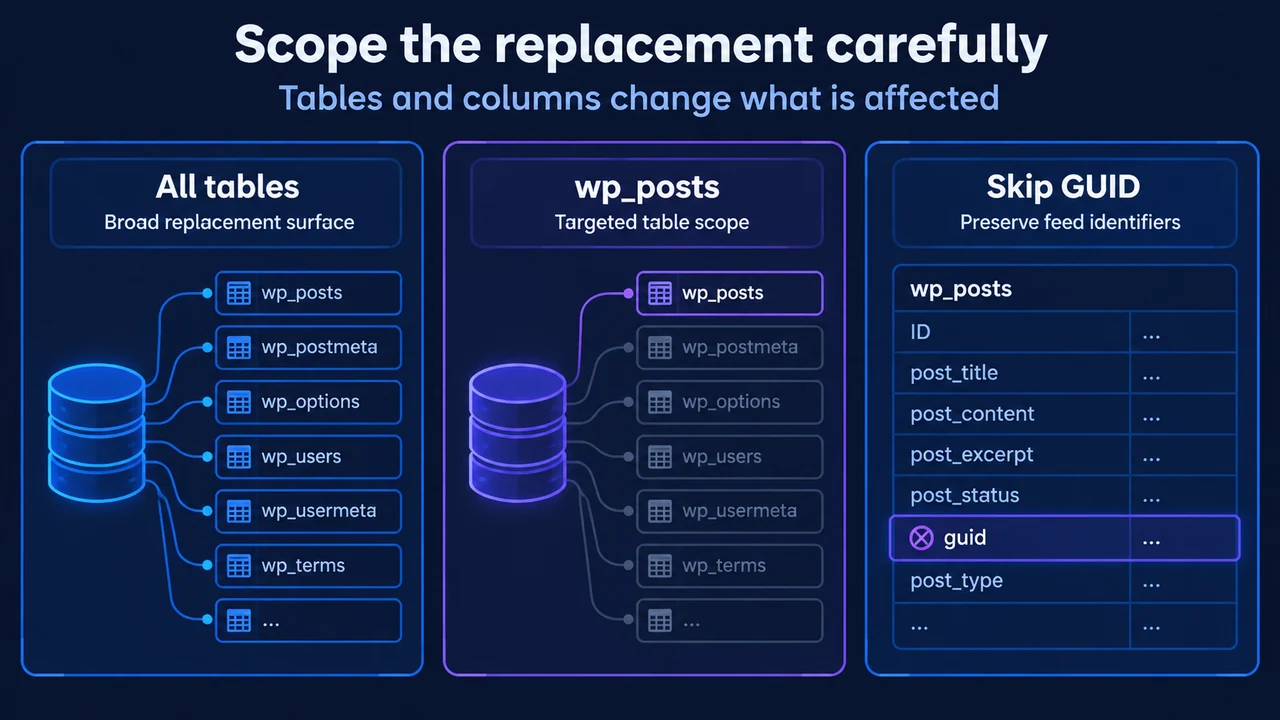
The handbook explicitly adds a safety limitation: “Note: Only perform a search and replace on the wp_posts table.” While WP-CLI’s wp search-replace command defaults to operating across all tables registered to $wpdb, administrators can restrict execution by passing explicit positional table arguments such as wp_posts, or by skipping sensitive tables with --skip-tables.
GUID Preservation Rules
The migration documentation strictly warns never to alter the guid column in the wp_posts table under any circumstances. In WordPress, “GUID” stands for Globally Unique Identifier. It is intended to remain permanent across all space and time to identify a specific post.
WordPress convention uses the permalink URL (or a form of it) to establish uniqueness, meaning old URLs frequently appear inside the guid column. However, the GUID’s role is distinct from site links: feed readers record GUID values to determine whether an item has already been displayed. If an administrator updates GUID entries to match a new domain, feed readers will treat previously read posts as new items, reflooding subscriber feeds with duplicate entries. Preserving the guid column keeps feed tracking intact even when site URLs are replaced elsewhere in wp_posts.
WP-CLI Command Controls
WP-CLI provides dedicated commands to manage database search-and-replace tasks and database exports.
WP-CLI wp search-replace
The wp search-replace command replaces matching strings and is documented to intelligently handle PHP serialized data without modifying primary key values. By default, it operates on tables registered to the $wpdb object (or current site tables in multisite unless --network is supplied).
Command syntax:
wp search-replace <old> <new> [<table>...]Documented options to control replacement scope and prevent data loss include:
[<table>...]: Limits replacement to specified tables (for example, targeting onlywp_postsas recommended in migration guidance, or matching wildcards like'wp_post*').--skip-columns=<columns>: Prevents replacement in specific comma-separated columns. This is used to exclude the GUID column:wp search-replace 'http://example.test' 'http://example.com' wp_posts --skip-columns=guid--dry-run: Executes the entire search-and-replace operation and produces a report without saving changes to the database.--skip-tables=<tables>: Skips specific comma-separated tables (supports wildcards).--precise: Forces the use of PHP instead of SQL for a more thorough, though slower, replacement.--regex: Runs search using regular expressions without delimiters (documented to take roughly 15 to 20 times longer).--export[=<file>]: Writes transformed data directly to an SQL file instead of modifying the active database (or outputs to STDOUT if omitted).--network: Extends replacement across all tables registered to$wpdbin a multisite install.
WP-CLI wp db export
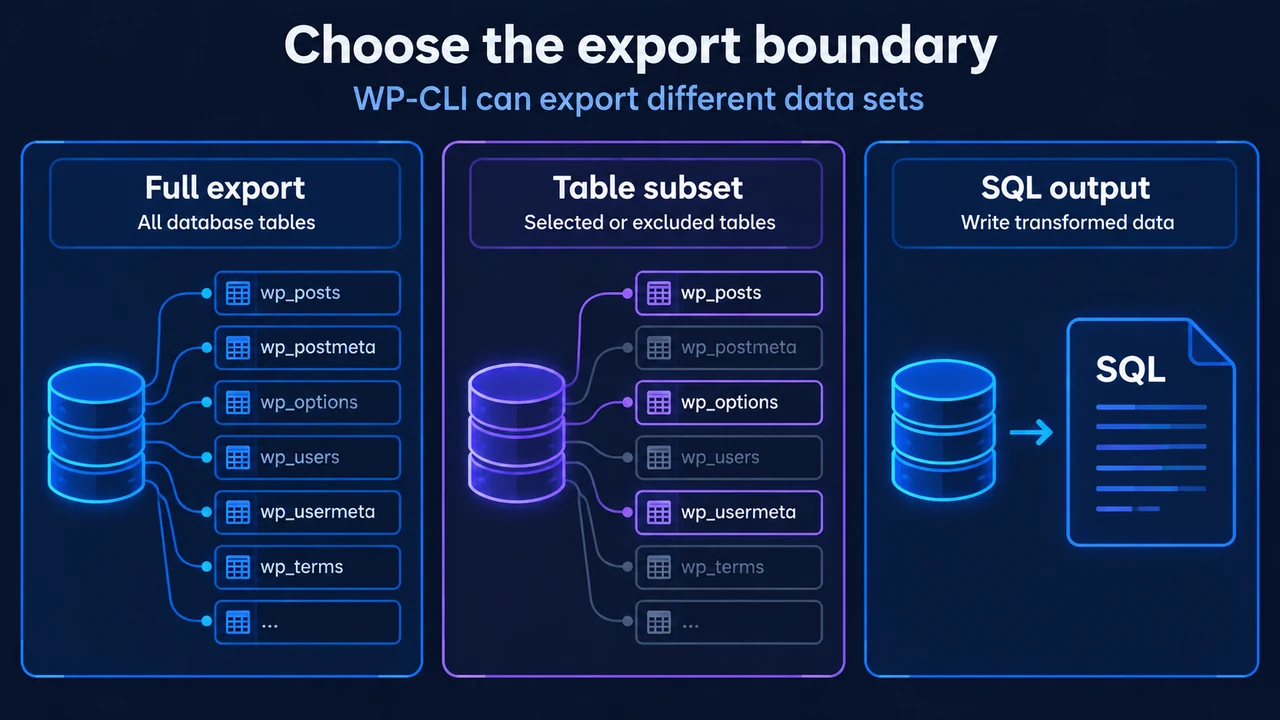
The wp db export command dumps the WordPress database to an SQL file or STDOUT. It runs on the after_wp_config_load hook and executes the mysqldump utility using database credentials (DB_HOST, DB_NAME, DB_USER, DB_PASSWORD) loaded from wp-config.php.
Relevant options include:
[<file>]: Specifies the export filename. Defaults to'{dbname}-{Y-m-d}-{random-hash}.sql'if omitted, or STDOUT if specified as-.--tables=<tables>: Restricts export to a comma-separated list of tables.--exclude_tables=<tables>: Omits specific comma-separated tables from export.--add-drop-table: Adds aDROP TABLE IF EXISTSstatement prior to eachCREATE TABLEstatement.--defaults: Loads MySQL option files from the environment (skipped by default to prevent misconfiguration errors).
Research Method and Limitations
This article was prepared solely from the supplied public documentation excerpts retrieved on 2026-09-17: the official WP-CLI command reference pages for wp search-replace and wp db export, and the WordPress Advanced Administration Handbook entry on Migrating WordPress. The supplied migration handbook excerpt was partially truncated, and unseen text was not treated as support for additional migration procedures or hosting configurations. No competing coverage was included because the secondary blog excerpt did not address database serialization mechanics or WP-CLI search-and-replace controls.
Text version of the diagrams
- Scope the replacement carefully: All tables — Broad replacement surface; wp_posts — Targeted table scope; Skip GUID — Preserve feed identifiers
- Choose the export boundary: Full export — All database tables; Table subset — Selected or excluded tables; SQL output — Write transformed data